使用PyTorch查看卷积神经网络中间层的输出
示例代码
from torchvision import models, transforms
from PIL import Image
import matplotlib.pyplot as plt

transform = transforms.Compose(
    [
        transforms.Resize(224),
        transforms.ToTensor(),
    ]
)

img = Image.open(".\\data\\Dogs Vs Cats\\train\\dog.8708.jpg").convert("RGB")

tensor = transform(img).unsqueeze(0)

model = models.vgg16(weights=models.VGG16_Weights.IMAGENET1K_V1)

features = None


def hook_fn(module, input, output):
    global features
    features = output


hook = model.features[0].register_forward_hook(hook_fn)
output = model(tensor)
hook.remove()

figure = plt.figure(figsize=(16, 6))
figure.subplots_adjust(left=0, bottom=0, right=1, top=1, wspace=0, hspace=0)

for i in range(64):
    graph = features[0][i].detach().numpy()
    ax = figure.add_subplot(8, 8, i + 1)
    ax.imshow(graph, cmap="gray")
    ax.axis("off")

plt.show()
效果图
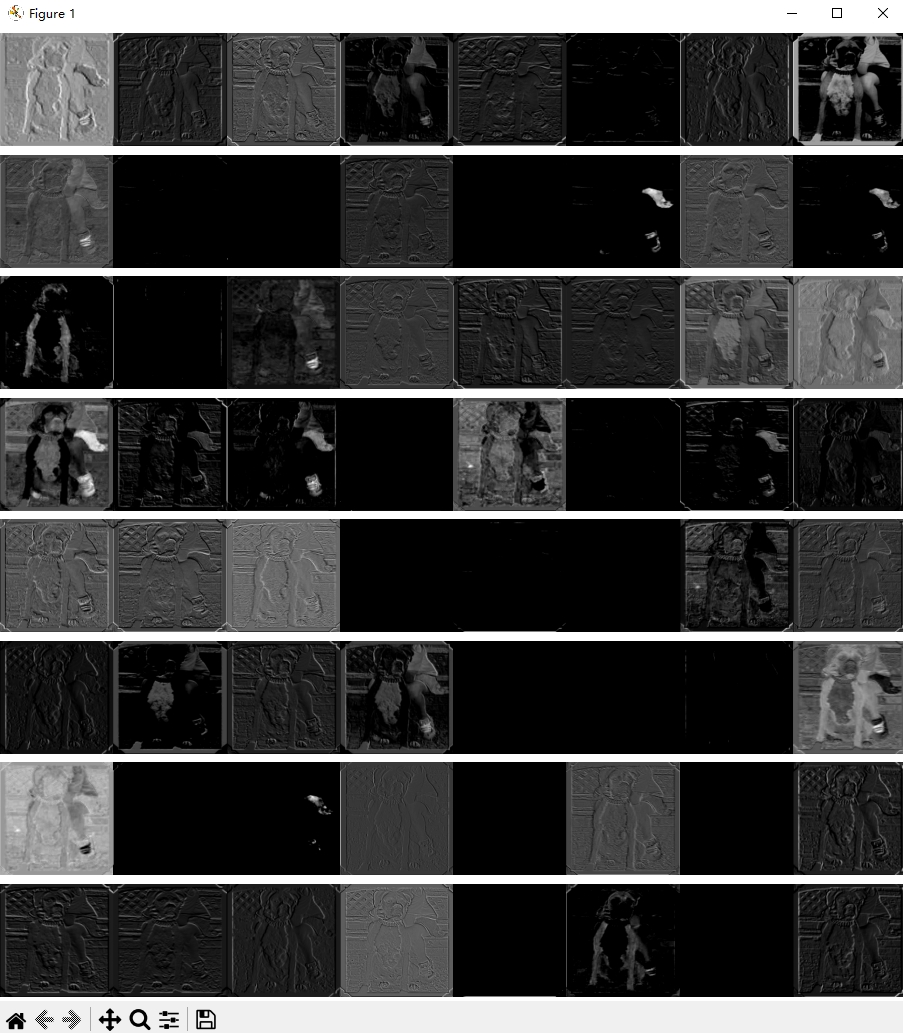
最后更新于1年前
本文由人工编写,AI优化,转载请注明原文地址: 使用PyTorch查看卷积神经网络中间层的输出