绘世启动器使用指南:秋叶aaaki的Stable Diffusion整合包教程
绘世启动器是b站大神秋葉aaaki(简体字:秋叶aaaki)制作的Stable Diffusion WebUI整合包,用于本地使用深度合成技术生成图片。除了Stable Diffusion WebUI整合包,秋葉aaaki也提供了ComfyUI的整合包。
常用网站
秋葉aaaki主页:https://www.bilibili.com/video/BV1iM4y1y7oA/
关于秋葉aaaki:https://ai.feishu.cn/wiki/I5qCwlPXMiFOn7khNZScAOTCnoc
Stable Diffusion WebUI整合包下载:https://ai.feishu.cn/wiki/UkOuwuc5liaJIbkEIh3cDB6Tnzg
ComfyUI整合包下载:https://ai.feishu.cn/wiki/P7Qzwfnx4inVFLkVIPbclmY0nvb
解压密码:bilibili-秋葉aaaki
使用方法
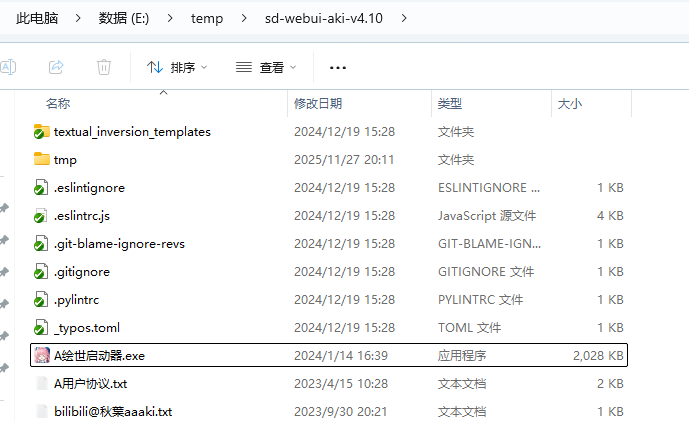
1、下载并解压sd-webui-aki-v4.10.7z。
2、双击A绘世启动器.exe启动程序。
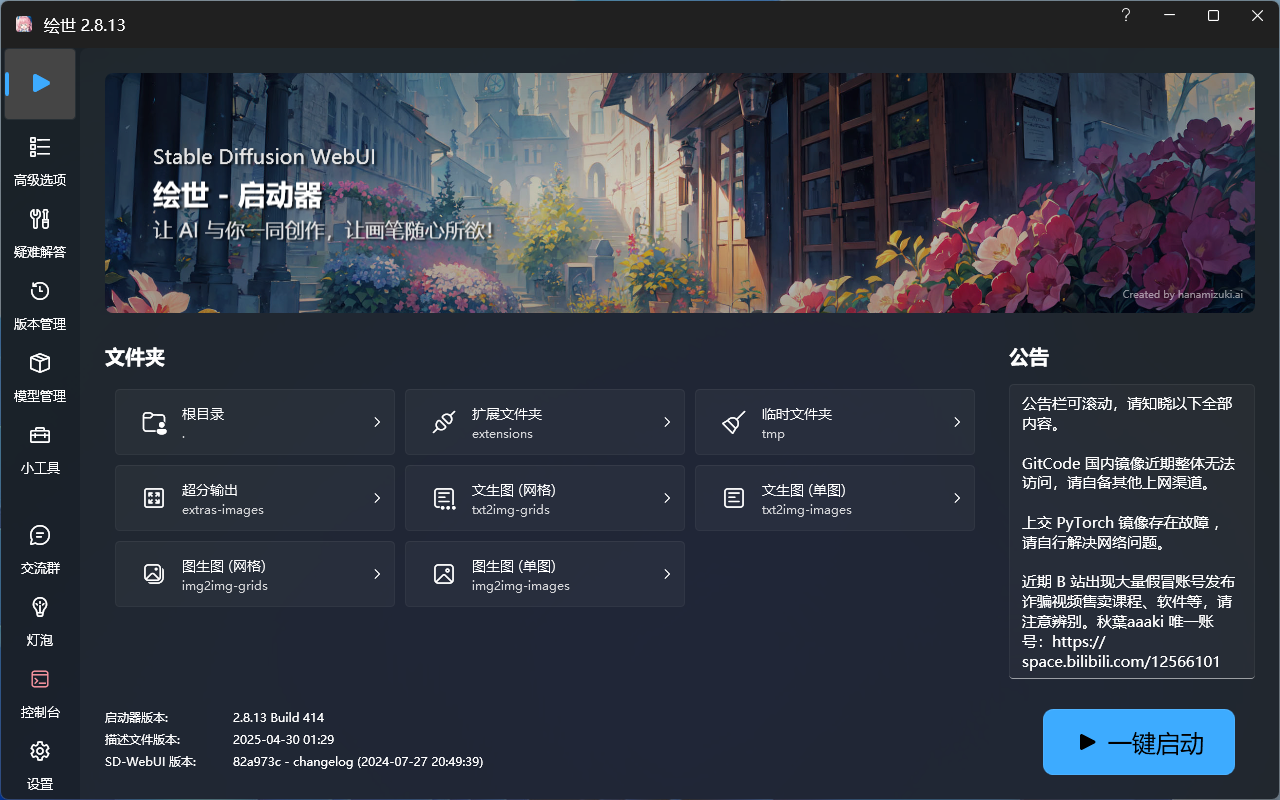
桌面客户端
桌面客户端具有一键启动、高级选项、疑难解答、版本管理、模型管理、小工具、设置等很多功能,点击一键启动选项卡的一键启动按钮会自动打开浏览器,打开Stable Diffusion WebUI页面。
Stable Diffusion WebUI
这是秋葉aaaki在Stable Diffusion WebUI开源项目的基础上安装了很多插件形成的页面,功能很多,例如:文生图、图生图、后期处理、PNG图片信息、模型融合、训练等。
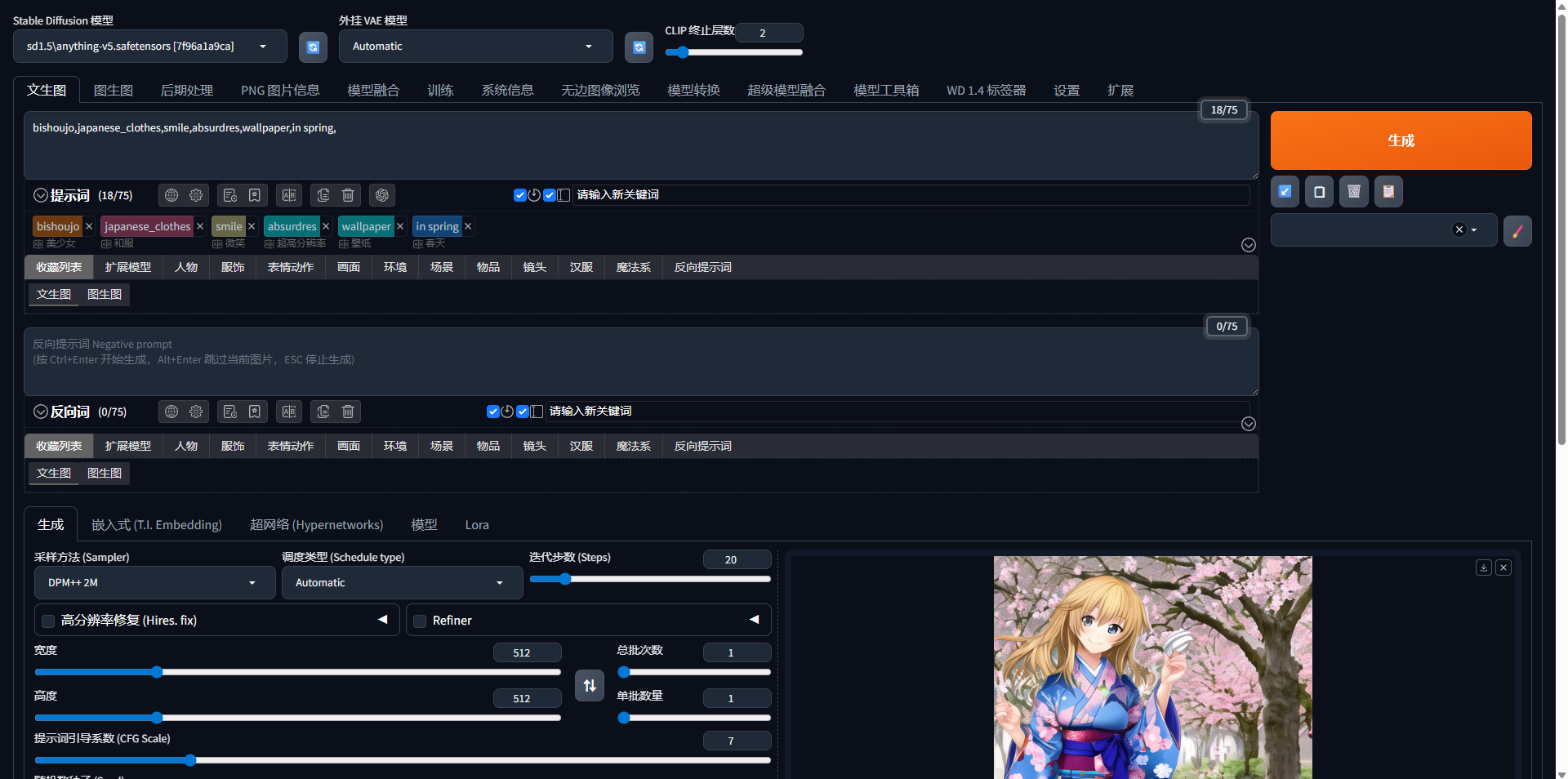
生成图片示例
提示词:bishoujo,japanese_clothes,smile,absurdres,wallpaper,in spring,

常见问题
1、渲染出的图片是一张噪点图或灰色的图片。
SD更新后模型没更新的问题,用最新的anything-v5-PrtRE测试即可。
相关项目
1、stable-diffusion-webui:https://github.com/AUTOMATIC1111/stable-diffusion-webui
2、a1111-sd-webui-tagcomplete:https://github.com/DominikDoom/a1111-sd-webui-tagcomplete
3、adetailer:https://github.com/Bing-su/adetailer
4、multidiffusion-upscaler-for-automatic1111:https://github.com/pkuliyi2015/multidiffusion-upscaler-for-automatic1111
5、sd-dynamic-thresholding:https://github.com/mcmonkeyprojects/sd-dynamic-thresholding
6、sd-webui-controlnet:https://github.com/Mikubill/sd-webui-controlnet
7、sd-webui-infinite-image-browsing:https://github.com/zanllp/sd-webui-infinite-image-browsing
8、sd-webui-lora-block-weight:https://github.com/hako-mikan/sd-webui-lora-block-weight
9、sd-webui-model-converter:https://github.com/Akegarasu/sd-webui-model-converter
10、sd-webui-openpose-editor:https://github.com/huchenlei/sd-webui-openpose-editor
11、sd-webui-prompt-all-in-one:https://github.com/Physton/sd-webui-prompt-all-in-one
12、sd-webui-segment-anything:https://github.com/continue-revolution/sd-webui-segment-anything
13、sd-webui-supermerger:https://github.com/hako-mikan/sd-webui-supermerger
14、stable-diffusion-webui-localization-zh_Hans:https://github.com/hanamizuki-ai/stable-diffusion-webui-localization-zh_Hans
15、stable-diffusion-webui-model-toolkit:https://github.com/arenasys/stable-diffusion-webui-model-toolkit
16、stable-diffusion-webui-wd14-tagger:https://github.com/toriato/stable-diffusion-webui-wd14-tagger
17、ultimate-upscale-for-automatic1111:https://github.com/Coyote-A/ultimate-upscale-for-automatic1111
推荐阅读
VMware Workstation 17许可证密钥及免费激活方法详解
XWiki知识库基础版与专业版正式上架:把知识沉淀与隐私管理,握回自己手中
三维 GIS 开发工具清单:从数据处理到地图展示,这一篇就够了
CodeBuddyIDE与Trae终极对决:谁是最强国产AI编程IDE?最新版本深度横评
Kiro IDE深度体验:无需魔法畅享Claude 4.5,但文件拖拽为何如此难用?
深信服VPN客户端下载:EasyConnect与aTrust零信任访问指南
评论 (2)
请 登录 后发表评论
 北方狼2025-11-28 19:28:56
感谢秋叶大佬的整合包!跟着教程一次就启动成功了,新手也能轻松上手。想问问启动器里的模型管理能直接下载常用模型吗?
 管理员2025-11-28 19:49:33
可以直接下载常用模型